ShareX

A productivity tool for screen capture and file sharing

Source Donate
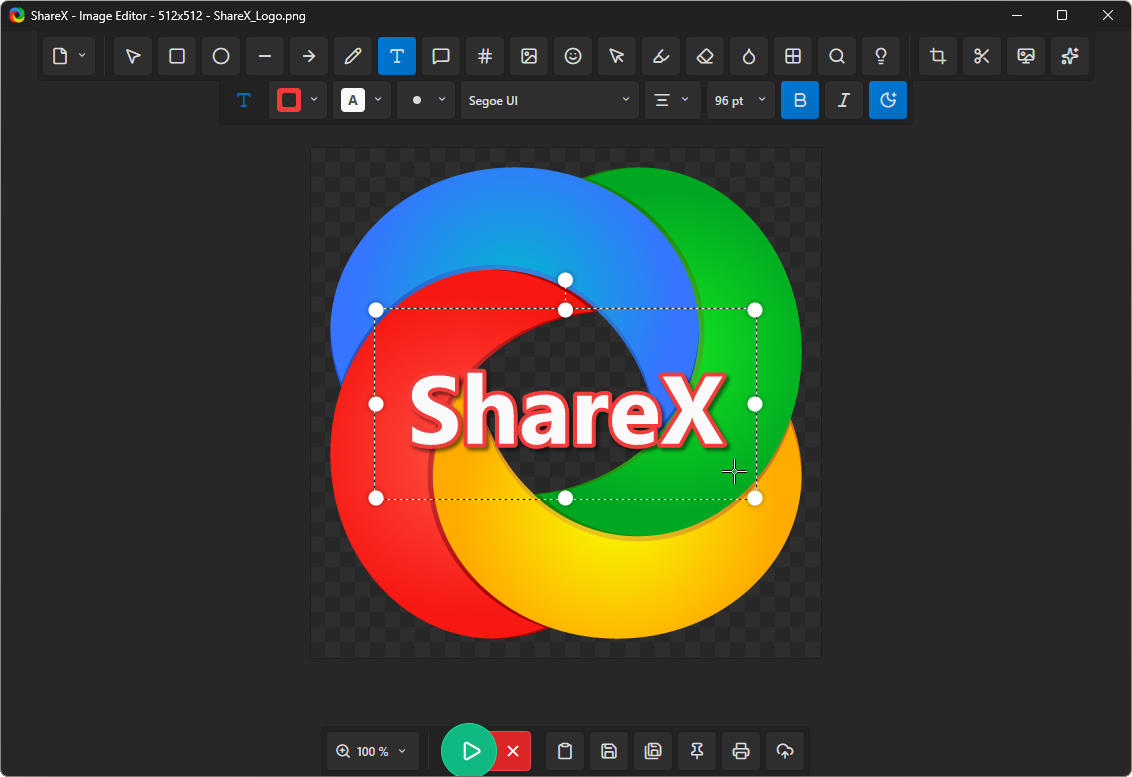
A screenshot displaying the ShareX image editor interface.
View more screenshots

Why ShareX?

ShareX is a free, open-source screenshot utility for Windows. This lightweight application combines screen capture, screen recording, file sharing, and various productivity features.

Completely free
No advertisements
Lightweight
Over 18 years of active development
Trusted by large companies
Built for power users
Quick screenshot sharing
Easy GIF recording
Supports a wide range of destinations
Adaptable Workflow System

Languages

ShareX is available in the following languages.

العربية (Arabic)
Nederlands (Dutch)
English
Français (French)
Deutsch (German)
עִברִית (Hebrew)
Magyar (Hungarian)
Bahasa Indonesia (Indonesian)
Italiano (Italian)
日本語 (Japanese)
한국어 (Korean)
Español mexicano (Mexican Spanish)
فارسی (Persian)
Polski (Polish)
Português (Portuguese)
Português-Brasil (Portuguese-Brazil)
Română (Romanian)
Русский (Russian)
简体中文 (Simplified Chinese)
Español (Spanish)
繁體中文 (Traditional Chinese)
Türkçe (Turkish)
Українська (Ukrainian)
Tiếng Việt (Vietnamese)

Capture

Capture your screen in various ways—the entire display, a specific area, an active program window, a long scrolling page, or an individual monitor. Afterward, automatically process the result with post-capture actions.

Capture Options

Fullscreen
Active window
Active monitor
Window menu
Monitor menu
Region (Light)
Region (Transparent)
Last region
Custom region
Auto capture

Post-Capture Actions

Show quick task menu
Show "After capture" window
Beautify image
Open in image editor
Copy image to clipboard
Print image
Save image to file
Save image to file as...
Save thumbnail image to file
Copy file to clipboard
Copy file path to clipboard
Copy folder path to clipboard
Show file in explorer
Analyze image
Scan QR code
Show "Before upload" window
Upload image to host
Delete file locally

Region capture

Region captureThis feature offers drawing and annotation capabilities, allowing you to mark screenshots prior to saving, copying, or uploading them.

Types of Regions

Rectangle
Ellipse
Freehand

Annotation Tools

Rectangle
Ellipse
Freehand
Freehand arrow
Line
Arrow
Text (Outline)
Text (Background)
Speech balloon
Step
Magnify
Image (File)
Image (Screen)
Sticker
Cursor
Smart eraser
Blur
Pixelate
Highlight
Spotlight
Crop image
Cut out

Image editor

The ShareX image editorYou can use this tool to add annotations to screenshots, obscure sensitive details, crop images, insert callouts, and get captures ready for copying, saving, or uploading.

Annotation Tools

Rectangle
Ellipse
Line
Arrow
Freehand
Text
Callout Bubbles
Step
Image
Emoji
Cursor
Highlight
Intelligent Eraser
Blur
Pixelate
Magnify
Spotlight
Crop
Cut Out
Background
Picture Adjustments

Upload

Send images, files, entire folders, clipboard contents, text snippets, or web addresses to your chosen storage location. Then, the resulting link can be automatically copied, opened, shortened, or shared.

How to Upload

Upload file
Upload a Folder
Upload from Clipboard
Upload text
Upload from a URL
Drag-and-Drop Upload
Shorten URL
Tracked Folder

Actions After Upload

Display "After upload" options
Shorten URL
Share URL
Place URL in Clipboard
Open URL
Show QR Code Window

Productivity Tools

ShareX also provides various everyday tools to enhance productivity. These include utilities for editing pictures, selecting colors, scanning QR codes, verifying hashes, viewing metadata, and managing clipboard items.

Color Selection Tool
On-Screen Color Picker
Ruler
Image Enhancer
Image Viewer
Image Comparison
Combine Images
Split Images
Create Image Thumbnails
Convert Videos
Generate Video Thumbnails
Examine Image
QR code
Verify Hash
Metadata
Index Directory
View Clipboard
Window Without Border
Examine Window
Test Monitor

Want to capture, modify, and share more quickly?

Always free. Open-source software. No user account is necessary.